You want to record a few creators' public profiles, but tutorials immediately introduce SDKs, async jobs and databases. The first version can be much smaller: request one Instagram account and save the response.
This guide uses the ordinary Python requests library. You do not need a dedicated TRMesh SDK. Once you understand one result, you can decide whether a spreadsheet or scheduled job is useful.

Prepare one account and a working folder
Choose a public account you can open on the original platform. Use the username from its profile URL, not a display name shared by several people. Create a folder for the script and local output. Exclude collected profile files from version control if you later publish the code.
Run python --version, then python -m pip install requests. If your system uses python3, use that consistently. On Windows, py -m pip install requests can help ensure that installation uses the interpreter you intend to run.
Configure the credential locally
This is for your own developer script, distinct from the free homepage lookup. Create a TRMesh developer key and set TRMESH_API_TOKEN in your local environment. Keep the actual value out of comments, prompts and source repositories.
A variable set only in one terminal may be absent in a new window. After changing a system environment variable, open a new terminal. A missing-variable KeyError happens locally before any request is sent.
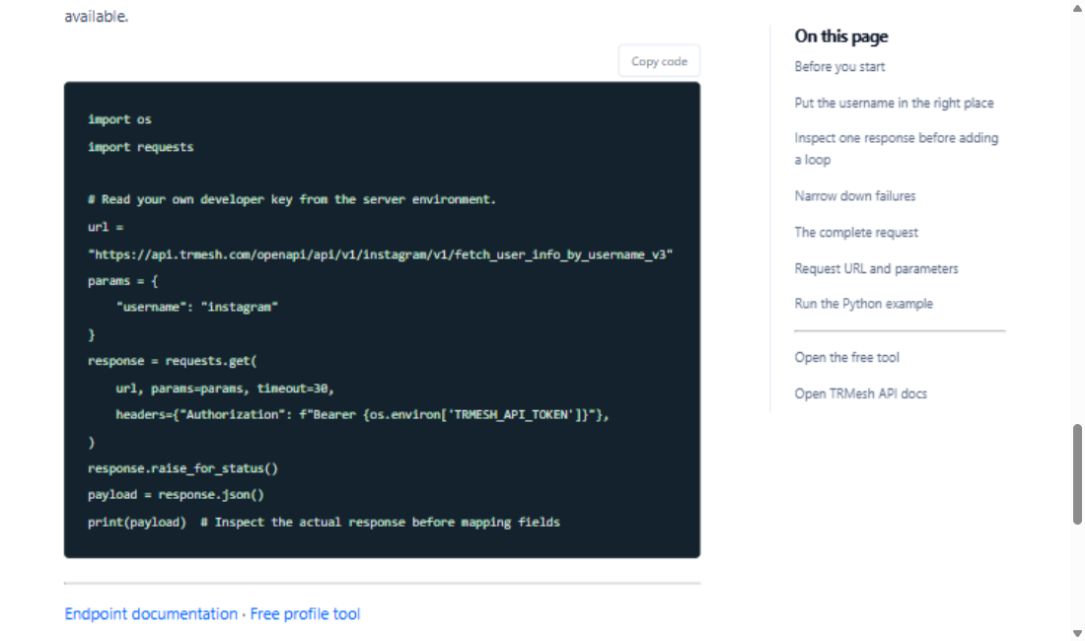
Save the request below as lookup.py
The full endpoint, parameter table and Python example follow this walkthrough. Replace the sample username with your target while retaining the endpoint version. Run python lookup.py and inspect the complete response before writing nested field access.
A long JSON response is not sufficient evidence of success. Confirm the account identity and check for a business error or unavailable object. A request identifier, user identifier and observation time have different meanings.
Save a response for later inspection
Append this after the request has successfully produced payload:
import json
from datetime import datetime, timezone
from pathlib import Path

snapshot = {
    "observed_at": datetime.now(timezone.utc).isoformat(),
    "source_url": url,
    "query": params,
    "response": payload,
}
Path("profile-snapshot.json").write_text(
    json.dumps(snapshot, ensure_ascii=False, indent=2),
    encoding="utf-8",
)
This continuation uses url, params and payload from the request in the same script. It does not save the Authorization header. It overwrites the file on the next run; use dated filenames when you intentionally begin keeping observations over time. Keep collected material within the scope of your research rather than exposing it in a public download folder.
Find the layer where a failure occurs
| Symptom | First check |
|---|---|
| requests is missing | Install it with the interpreter running the script |
| TRMESH_API_TOKEN is missing | Check the current terminal environment without printing the key |
| Non-success HTTP status | Read the actual error and check permissions, parameters, allowance or rate limits |
| HTTP success without account data | Inspect business status and account availability |
| Timeout | Check connectivity and service status before retrying |
Log time, status and request identifiers when available, not credentials. Do not infer an exact cause that the error response does not establish.
Expand to three accounts before building a pipeline
Query a few accounts sequentially. Keep platform and observation time with each record. Extract fields you have verified, leave missing metrics empty and compare changes only when both observations exist.
For TikTok, YouTube or Reddit, reuse the request and storage pattern but verify each full endpoint, parameter and response. A unified REST interface does not mean identical follower, like or view fields across platforms.
Add scheduling, pagination and concurrency only when this small script is already useful and understandable.
Topic inspiration: the Python SDK mirror and its upstream README. This tutorial independently calls TRMesh with requests; it does not rename the third-party package.
Request URL and parameters
GET https://api.trmesh.com/openapi/api/v1/instagram/v1/fetch_user_info_by_username_v3
| Parameter | Type | Required | Meaning |
|---|---|---|---|
username |
string | Yes | Instagram username |
Run the Python example
Install requests and set TRMESH_API_TOKEN in your environment. Replace the sample identifiers with the public object you intend to inspect. Example IDs may no longer be available.
import os
import requests

# Read your own developer key from the server environment.
url = "https://api.trmesh.com/openapi/api/v1/instagram/v1/fetch_user_info_by_username_v3"
params = {
    "username": "instagram"
}
response = requests.get(
    url, params=params, timeout=30,
    headers={"Authorization": f"Bearer {os.environ['TRMESH_API_TOKEN']}"},
)
response.raise_for_status()
payload = response.json()
print(payload)  # Inspect the actual response before mapping fields
Endpoint documentation · Free profile tool
API calls use your TRMesh account allowance. Check the endpoint price before running a script.